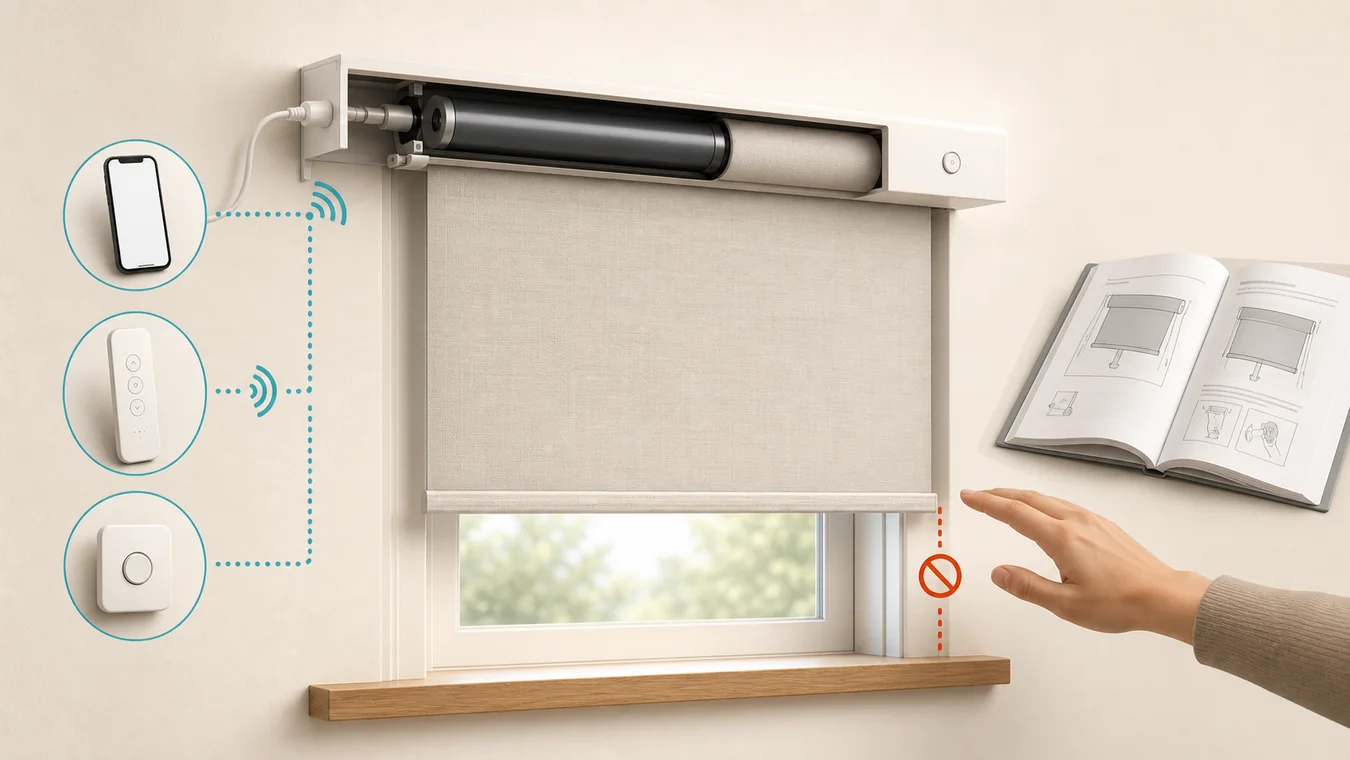
Sometimes – but only when the documentation for the exact blind, motor and operating system says how. A remote, wall control or button on the headrail may let you operate a shade without the app, but it still uses the motor and available power. That is not the same as moving the fabric or bottom rail by hand.
Do not tug a stalled motorized shade to discover the answer. First identify what stopped: the app or hub, the remote, household power, the shade battery, or the motor and mechanism. Each failure leaves a different set of controls available.
Start with the failed layer, not the fabric
| What failed | What may still work | Still needs shade power? | May you move it by hand? | Best next step |
|---|---|---|---|---|
| App, Wi-Fi or hub | A paired remote, documented local button or stored automation | Yes | Not proven | Try only the exact local controls named in the product manual. |
| Remote is lost, flat or unpaired | The app or a documented button on the shade | Yes | Not proven | Replace the remote battery or restore pairing with exact support instructions. |
| Household electricity | A self-powered battery shade and a control path that remains available | Yes, usually from its battery | Only if explicitly documented | Identify whether the shade, hub, repeater and control each have power. |
| Shade battery is empty | Charging or battery replacement; a narrow product-specific fallback may exist | Powered movement does | Only if explicitly documented | Follow the exact battery and manual-operation section. |
| Motor runs but the covering does not move, moves crooked or sounds unusual | No generic fallback | Unknown | Do not use hand force as a repair | Stop and contact the manufacturer, dealer or installer. |
| Nothing responds | A documented power check or local operation test | Yes for powered tests | Not proven | Confirm exact product identity and power before resets or movement. |
An app failure is not a power outage. A dead remote is not a dead motor. A dead shade battery is not necessarily permission to pull. This separation is the most useful first diagnosis.
Hunter Douglas says some Legacy PowerView shades can respond to a remote but not the app because each control path is paired separately. Its Legacy PowerView troubleshooting also uses a programming button on the headrail to test basic powered operation. Those are exact-system examples, not proof that every blind has the same button.
A local button is not a manual override
Window-covering language makes this question harder than it should be. “Manual” may refer to any of four different actions:
- pressing a button mounted on the shade;
- using a handheld remote instead of an app;
- initiating movement by touching a product designed for touch operation; or
- physically moving the covering through a documented mechanical override.
The first two are local controls, but the motor still does the work. Touch operation is also product-specific: a hand may start the command while the motor completes the travel. Only the fourth meaning answers whether the covering itself may be moved without normal powered travel.
Treat labels such as “manual button” cautiously. In a support document, that can mean “the button you press by hand,” not “a mechanism that disconnects the motor.” Look for an explicit phrase tied to your exact model: “manual override,” “manual pull,” “touch motion,” or a described emergency crank or clutch. The method, direction and failure condition matter as much as the feature name.
The same question has opposite correct answers
IKEA UK’s support page says a FYRTUR blind with a depleted battery may be gently pulled down by hand, but it cannot be raised until the battery has enough charge. That is a real physical fallback, yet it is limited to the named product, the depleted-battery condition and one direction.
Hunter Douglas gives the opposite answer for a different configuration. Its current instructions for PowerView Gen 3 motorized arches and angled Duette and Applause honeycomb shades say those products have no manual override; movement is through the app, remote or schedules.
Both documents can be correct. They describe different coverings, motors, operating systems and mechanics. That is why a reseller’s broad “yes” or “no” should never overrule the manual for the item in front of you.
If a motor can be heard but the covering does not travel, or a rail moves crooked, do not reinterpret the IKEA example as a generic repair technique. Hunter Douglas routes comparable documented symptoms to installer or dealer evaluation. Across brands, the cause could be inside the drive, lift system, tube, cord path or covering itself; a public category article cannot diagnose it safely.
Verify the exact configuration before touching it
Start with the identity label, not the app name. A smart-home app can control several generations and more than one motor family.
- Photograph the shade label, motor-end label, battery or power-supply label and remote model. Record any installer invoice or order number.
- Name the covering and movement: roller shade, cellular shade, Roman shade, blind tilt, blind lift, drapery track or specialty shape. “Motorized blinds” is not precise enough for a manual.
- Find the manufacturer document for that exact product, motor and generation. Search within it for manual override, manual pull, touch operation, local button, power failure, depleted battery and emergency operation.
- Keep the boundary in writing: permitted action, permitted direction, required failure state and when to stop. If the document does not authorize physical movement, treat the answer as no until the manufacturer or installer confirms otherwise.
A video showing a similar-looking headrail is not enough. Tubular motors can share a housing while using different clutches, limits and control electronics. The product name on a dealer quote is also not enough if the motor option is selected separately.
Make the fallback part of the order
If privacy, glare control or access to an exit makes a fallback important, ask for it before approving the configuration. “Includes remote” does not answer what happens when the remote fails, and “smart control” does not answer what happens when the network is down.
For an app-independent system, require the exact local control path and whether it depends on a hub, repeater or household power. Use the smart-blinds compatibility guide to trace those control layers instead of assuming that a logo on the box guarantees local operation.
For an outage concern, compare battery, solar, plug-in and hardwired power by the components that must remain available. A battery inside the shade may preserve motor power while a required hub or repeater loses power. Use the power-source guide for that architecture, then return to the exact manual to determine whether physical movement is separately supported.
For a retrofit, state whether ordinary manual use must remain available after the motor is added. Some retrofits automate only tilt or only a chain-driven roll, and keeping the original hand motion is an exact mechanism question. Use the existing-blinds retrofit guide to identify the motion being taken over before treating “manual override” as a product filter.
For a high window, a manual feature that requires reaching the headrail may not be a usable fallback. Charging, reset access and service reach should be accepted along with everyday control, as the high-window motorized-blinds guide explains.
Once these branches are clear, return to the Smart Motorized Blinds Planner to keep fallback requirements aligned with fit, power, controls and room needs.
Keep one line with the order and manual: shade and motor – power source – local powered control – exact physical-override wording – service contact. If the physical-override field is blank, do not fill it in by pulling the shade.