“Smart blinds,” “motorized shades,” “electric shades,” and “retrofit motors” overlap, but they do not describe the same purchase. The useful distinction is what you are buying: a complete new covering, a powered version of a shade, or a motor added to an existing compatible tube or mechanism.
Start with that category choice. It prevents a retrofit kit from being compared with a complete shade and keeps app features from distracting from fit, fabric, power, and local control.
Translate the labels into the product you are actually buying
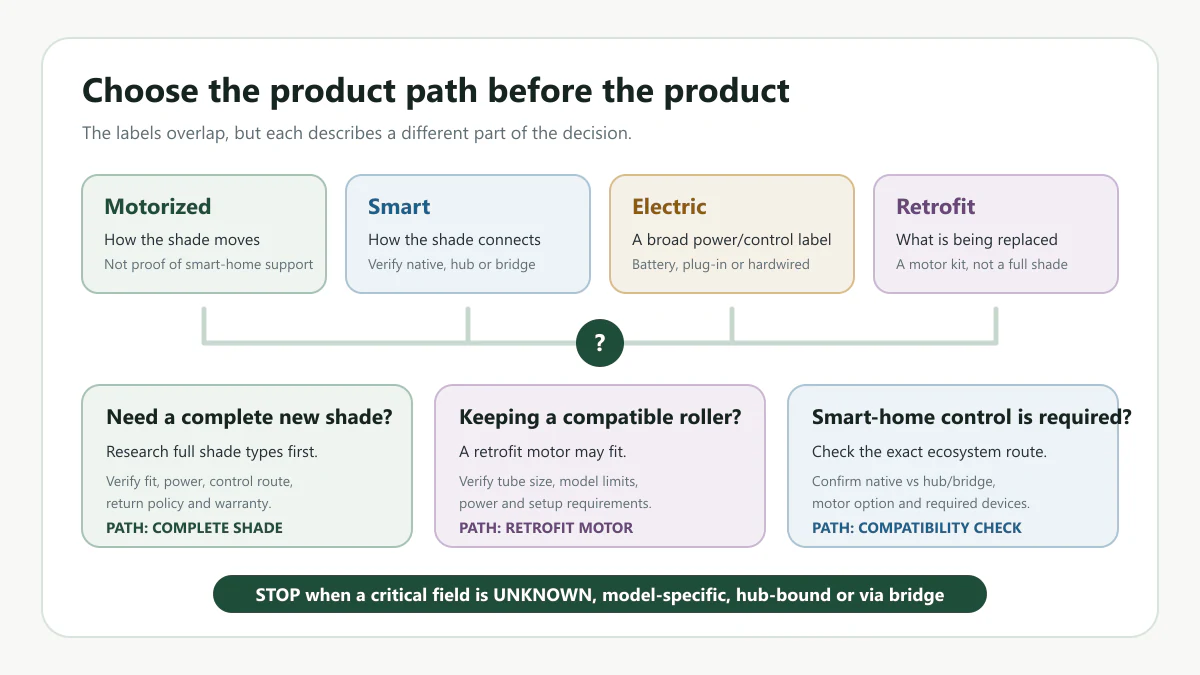
The terms below often appear together in search results and merchant navigation. Use them as research labels, then verify the exact product type, motor, power path, and hub or bridge requirement before making a buying decision.
| Term users search | Practical meaning | documented example type in this draft | What to check next | Required caveat |
|---|---|---|---|---|
| Motorized shade | A shade with motorized lift or control. It may or may not include app, voice, Matter, HomeKit, Alexa, Google Home, or SmartThings support. | SwitchBot Roller Shade is used only as a limited full-shade category example. | Mount depth, power source, control method, hub requirement, return policy, and warranty boundary. | Motorized does not automatically mean smart-home compatible. |
| Smart shade | A motorized shade or motor system with some smart-home path, such as app control, hub, bridge, Matter, HomeKit, Alexa, Google Home, or similar integration. | SwitchBot Roller Shade can illustrate a hub-bound smart-home path in this limited dataset. | Native vs bridge, hub required, exact ecosystem, selected motor, region, and current manufacturer documentation. | Hub-bound or via_bridge support is not the same as native support. |
| Retrofit shade motor | A motor kit or accessory intended to motorize a compatible existing shade or roller blind tube. | Eve MotionBlinds Upgrade Kit is used only as a limited retrofit motor example. | Tube fit, shade compatibility, Matter/Thread setup, border router needs, return terms, and warranty terms. | A retrofit motor is not a complete shade and should not be compared as one. |
| Electric shade | A broad shopping term that can mean motorized, rechargeable, plug-in, hardwired, remote-controlled, smart, or non-smart depending on the seller. | No separate product example is used for this term in this draft. | Power source, control method, hardwired boundary, professional installation needs, and whether smart-home support is actually included. | Electric is too broad to treat as a confirmed smart-home category. |
Why the terms overlap
One product can fit more than one label. A complete roller shade can be motorized because a motor raises and lowers it, smart because it connects through a supported ecosystem path, and electric because it uses a rechargeable or wired power source. A retrofit kit can also be motorized and smart while still not being a complete shade.
The useful distinction is therefore not “which label wins.” It is which part of the decision each label answers:
- Product scope: complete shade or motor-only retrofit?
- Movement: manual or motorized?
- Power: rechargeable, solar-assisted, plug-in, hardwired, or another documented path?
- Control: remote, app, voice, automation, or a combination?
- Integration: native, hub-bound, bridge-dependent, model-specific, or still unknown?
The words “blind” and “shade” in a search phrase also do not prove the physical product type. Read the exact product description and confirm whether the listing is a complete covering, a roller-shade assembly, or a motor accessory before comparing fit or price.
Choose the path that matches what you are replacing
Start with the window task, not the product label. The safest first question is: are you replacing the whole shade, adding motor control to an existing compatible shade, or trying to solve a smart-home integration problem?
- If you need a complete new window covering: research full shade rows first. Check shade type, mount depth, power source, return policy, warranty, and hub or bridge dependency before comparing brands.
- If you already have a compatible roller shade path: a retrofit motor may be relevant, but it should not be treated as a complete shade. Verify tube fit, model limits, Matter/Thread setup, and return terms.
- If your priority is HomeKit, Matter, Alexa, Google Home, or SmartThings: check the ecosystem path separately from the word “motorized.” Motorized control alone does not prove smart-home compatibility.
- If you are trying to avoid wiring: compare rechargeable battery, solar accessory, and plug-in paths before looking at brand preference. Any hardwired route needs the exact system documentation and a qualified professional.
- If a field says
UNKNOWN,varies,VARIES_BY_MODEL, hub-bound, orvia_bridge: treat that field as a stop-and-verify condition, not as a positive compatibility claim.
Examples that show where the categories split
The examples below are used only to show category boundaries. They are not recommendations, rankings, buying advice, price comparisons, or merchant endorsements.
| Example row | Category lesson | What the example clarifies | Do not assume |
|---|---|---|---|
| Eve MotionBlinds Upgrade Kit | Useful for explaining a retrofit shade motor path. | Product type as a shade motor, rechargeable battery, Matter/Thread fields, and model-specific tube/fit caveat. | It is not a complete shade. Do not rewrite it as a full-shade recommendation or skip fit verification. |
| SwitchBot Roller Shade | Useful for explaining a full roller shade with hub-bound smart-home control. | Product type as a roller shade, rechargeable/solar power, mount/depth planning, and hub-bound Matter/HomeKit/Alexa/Google caveats. | Do not rewrite hub-bound support as native support. The reviewed product documents do not establish SmartThings support. |
Compare only products that solve the same job
- Do not rank smart blinds against motorized shades.
- Do not call retrofit motors complete shades.
- Do not turn
via_bridgeor hub-bound support into native compatibility. - Do not use unknown SmartThings support as a positive compatibility claim.
- Do not treat an unsupported compatibility claim as product proof.
- Do not claim hands-on installation, app pairing, firmware testing, motor performance testing, or long-term ownership.
Choose the next check from the product scope
Use the terminology decision first, then move to a field-specific page. That keeps the shopping path from mixing incompatible categories.
- Need a complete new shade? Record the window measurements and mount constraints before narrowing the product category.
- Unsure whether the frame can support the plan? Compare inside and outside mount tradeoffs before treating a full-shade label as a fit decision.
- Still choosing the overall route? Return to the Smart Motorized Blinds Planner for the measurement, power, compatibility, and room-planning sequence.
Product documents checked
- Eve MotionBlinds product page, MotionBlinds support page, and Eve online shop terms were used for selected retrofit motor, Matter/Thread, fit, return, and warranty caveats.
- SwitchBot Roller Shade product page, SwitchBot return and refund policy, and SwitchBot warranty policy were used for selected roller shade, depth, power, hub-bound compatibility, return, and warranty caveats.
First identify whether you need a complete covering, a powered version of a new shade, or a retrofit motor. Once that category is clear, compare only products that solve the same job and use the main planner to continue with fit, power, and controls.